
Frequently Asked Questions
A collection of answers to your questions!

FREQUENTLY ASKED QUESTIONS (FAQ)
Click any of the links below to view that section of the FAQ:
|
These questions tend to be the most asked and is a good place to begin if you aren't sure which section to use. |
From here you can understand which areas to check when searching for funding along with links to our companion How-To video section. |
|
Everything from how to know when your membership renews to how many logins you can have per membership. |
Questions cover how and why we do things the 'GrantStation' way and even the difference between GS Verified and 990-PF profiles. |
|
How to add an email to the Insider, unsubscribe, and control the grant alert emails you receive. |
ONLINE EDUCATION | WEBINARS | ONLINE LEARNING ACADEMY (OLA) Learn when you will receive your webinar recording if you missed it, what "credits" refer to, how to log into your OLA account and more. |
MOST FREQUENTLY ASKED
GS does not offer grantwriting services. We do have an on-demand course which covers the entire process of writing a grant from initial research to managing your winning grant, step-by-step. We also have the Write section of our website that walks you through each step of the grant process.
We do not provide free trials. You can use our search filters to see the number of grantmakers associated with the search terms without being logged in. You can also watch a tour and see how the membership resources work on our How-To Videos page.
When you purchase a GS membership, you gain full access to our online grantseeking tools and resources.
Your membership includes:
- Search Tools: Discover new grant opportunities in our extensive database.
- Strategic Planning Tools: Build a strong grants strategy to maximize your funding success.
- Proposal Writing Support: Follow step-by-step tutorials to craft compelling proposals.
We offer flexible membership options—choose between a one-year or two-year plan.
Please note: Webinars and online education courses are not included with membership. They are available for purchase à la carte, or through an Online Learning Academy subscription.
Each grantmaker’s profile provides submission procedures. GrantStation does not accept any funding proposals other than those submitted through our Award Winning Grant Proposal Contest.
Contact us for a copy of the sales receipt and confirm receipt of the Zoom email with the link to the webinar.
- If you purchased through GrantStation and are set to auto-renew (link) Your credit card and membership will not be updated until the date of your current expiration date. The sales receipt will be generated when your credit card is charged. The sales receipt sender is: GrantStat LLC <quickbooks@notification.intuit.com>
- If you purchased through a Partner (link), you will receive the sales receipt within two days. The sales receipt sender is:
GrantStat LLC <quickbooks@notification.intuit.com>
- If you purchased through TechSoup. Log into your TechSoup account or contact techsoup.org.
Or contact our member services department.
After logging in, “Welcome [name]” will appear at the top of the web page. To view your expiration date, visit My Dashboard>My Profile.
GrantStation uses Stripe as a payment option. Stripe created Link to provide a way to check out and manage saved financial accounts. It is not a requirement to use Link in order to purchase an offering on GrantStation. Learn more about Link.
- If you have a membership through TechSoup please visit our TechSoup page.
- If you purchased through TechSoup and need a receipt, please visit TechSoup page and "How do I get a sales receipt?"
ONLINE EDUCATION | WEBINARS | ONLINE LEARNING ACADEMY (OLA)
Yes, you may purchase as a group or individually. The group allows up to ten people to attend the Zoom meeting. One person will be the group coordinator and will coordinate access using the custom link sent to them.
Yes, but make sure their email address is input as the webinar attendee. If you need assistance, contact us.
Webinars and online education courses are not included with membership. They are available for purchase à la carte, or through an Online Learning Academy subscription.
Many GrantStation Online Education webinars are recognized by GPCI (Grant Professional Certification Institute) for continuing education points, or credits. Each hour of training in one of these accepted training programs provides you one point of Certificate Maintenance Program (CMP) credit. Learn more about GPCI credits.
Many GrantStation Online Education webinars also qualify for CFRE (Certified Fund Raising Executive) points. Webinars that are denoted as CFRE provide you with points for Category 1.B -Education. These points can then be used for initial certification and/or recertification.
Check your Spam and junk folders. Contact us if you haven’t received the email.
Signing in is completely optional and is not required for viewing a video. It is an option provided by our video solutions provider ScreenCast.
Online Learning Academy Only
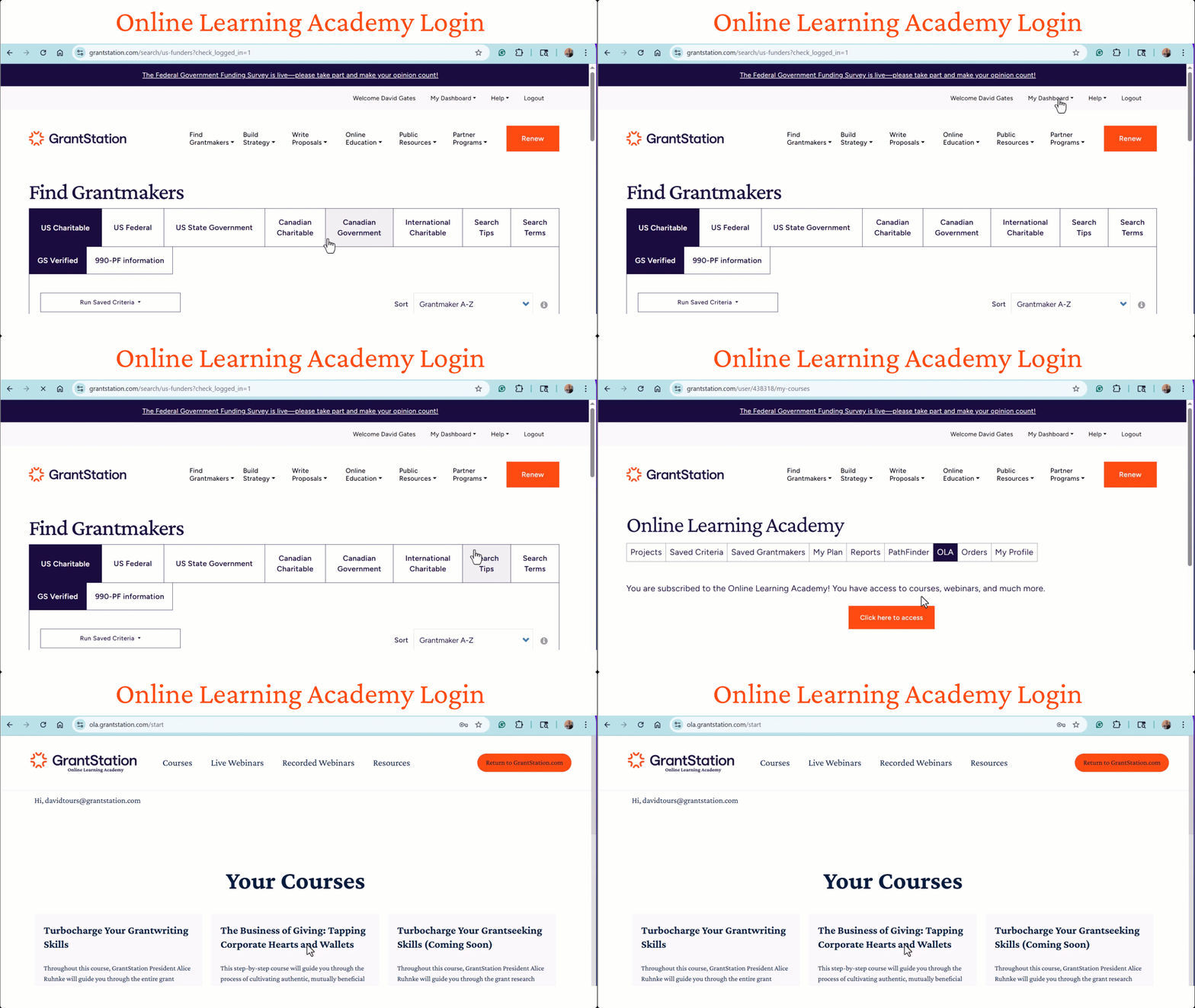
To access the Learning Academy:
- Go to your GrantStation Dashboard (make sure you’re logged in).
- Select Online Learning Academy from the menu.
- Then Click here to access academy.
This will take you directly into the Learning Academy, where you can explore courses, watch webinar recordings, and see upcoming events.
Online Learning Academy Only
Every Friday, you’ll receive an email with Zoom links for the following week’s webinars. Each link is unique to you, so please use it to join your session — and there’s no need to register yourself. These emails come directly from Zoom, so check your inbox (or spam folder) if you don’t see them.
Online Learning Academy Only
You may notice that the site still shows options to register for or purchase individual webinars — but please don’t make any purchases or take any actions. Once you’re enrolled in the Learning Academy, our system automatically registers you for all upcoming webinars at no additional cost.
Every Friday, you’ll receive an email with Zoom links for the following week’s webinars — these come directly from Zoom, so please keep an eye on your inbox (and check your spam or promotions folder just in case). Then, each Monday, we’ll send a quick reminder about what’s coming up.
If you ever have questions or don’t receive your Zoom links, contact our support team — we’re always happy to help!
Online Learning Academy Only
We’ve noticed that some learners have registered using one email address but are trying to access their course or communications with another. This can sometimes cause confusion or prevent you from receiving important updates.
Please double-check which email address you used when registering for the Online Learning Academy. All confirmation messages, Zoom links, and course communications will be sent to that email.
If you’re unsure which email you registered with, search your inboxes for your registration confirmation or contact us, and we’ll be happy to help you locate your registration.
PURCHASES & MEMBERSHIP
- Webinar - please contact info@grantstation.com and they can resend the sales receipt.
- Membership - If you renew your membership before the expiration date, your membership will be renewed, and your credit card will be charged for the expiration date. A sales receipt will be sent within two business days.
-
If purchased through GrantStation, your membership will auto-renew for your convenience. Please note that our auto-renewal feature was introduced in December 2024. If you want to manage this feature visit:
My Dashboard>My Profile>Manage Memberships, and you can change the auto-renew setting there.
- If you do not see a “Manage Membership” option, your membership was not set up with auto-renewal.
We do not offer refunds. If you are having trouble using your membership, please contact us! Our mission is for you to be successful in finding funding. Visit our How-To Video page to find ways to search for the funding you need.
- Yes, your credit card and membership will not be updated until the date of your current expiration date. The sales receipt will be generated when your credit card is charged.
- If your expiration date is more than 2 years away, please contact us if you wish to extend your membership further.
- If you purchased your membership with one of our partners, log into their website and go to their page that offers the GrantStation membership.
- Contact us if you need an invoice or assistance with the purchase.
After you log in, go to My Dashboard>Orders. This will only reflect purchases made while logged into your account.
No, we are set up only to accept payment in full for a membership.
Yes, contact us and we will send you an invoice.
When you purchase a GS membership, you gain full access to our online grantseeking tools and resources.
Your membership includes:
- Search Tools: Discover new grant opportunities in our extensive database.
- Strategic Planning Tools: Build a strong grants strategy to maximize your funding success.
- Proposal Writing Support: Follow step-by-step tutorials to craft compelling proposals.
We offer flexible membership options—choose between a one-year or two-year plan.
Please note: Webinars and online education courses are not included with membership. They are available for purchase à la carte, or through an Online Learning Academy subscription.
We accommodate one login per email per membership.
Yes, but you wouldn’t necessarily find many grant opportunities for for-profit organizations. You may want to contact your local Small Business Development Center.
Webinars and online education courses are not included with membership. They are available for purchase à la carte, or through an Online Learning Academy subscription.
We do not provide free trials. You can use our search filters to see the number of grantmakers associated with the search terms without being logged in. You can also watch our monthly tour and see how the membership resources work on our How-To Videos page.
- TechSoup generally sends us the enrollment information the week after TechSoup processes the purchase. You will receive a notification from GrantStation when your membership has been activated.
- If the GrantStation contact person is different from the TechSoup information, complete the Contact Update Form.
You will need to log in to the partner’s members-only website and go to their page or link, which offers the special member-only rate. Then you will be directed to our website to make the actual purchase.
Our rates are for non-profit organizations since those are our primary customers. We run promotions periodically throughout the year.
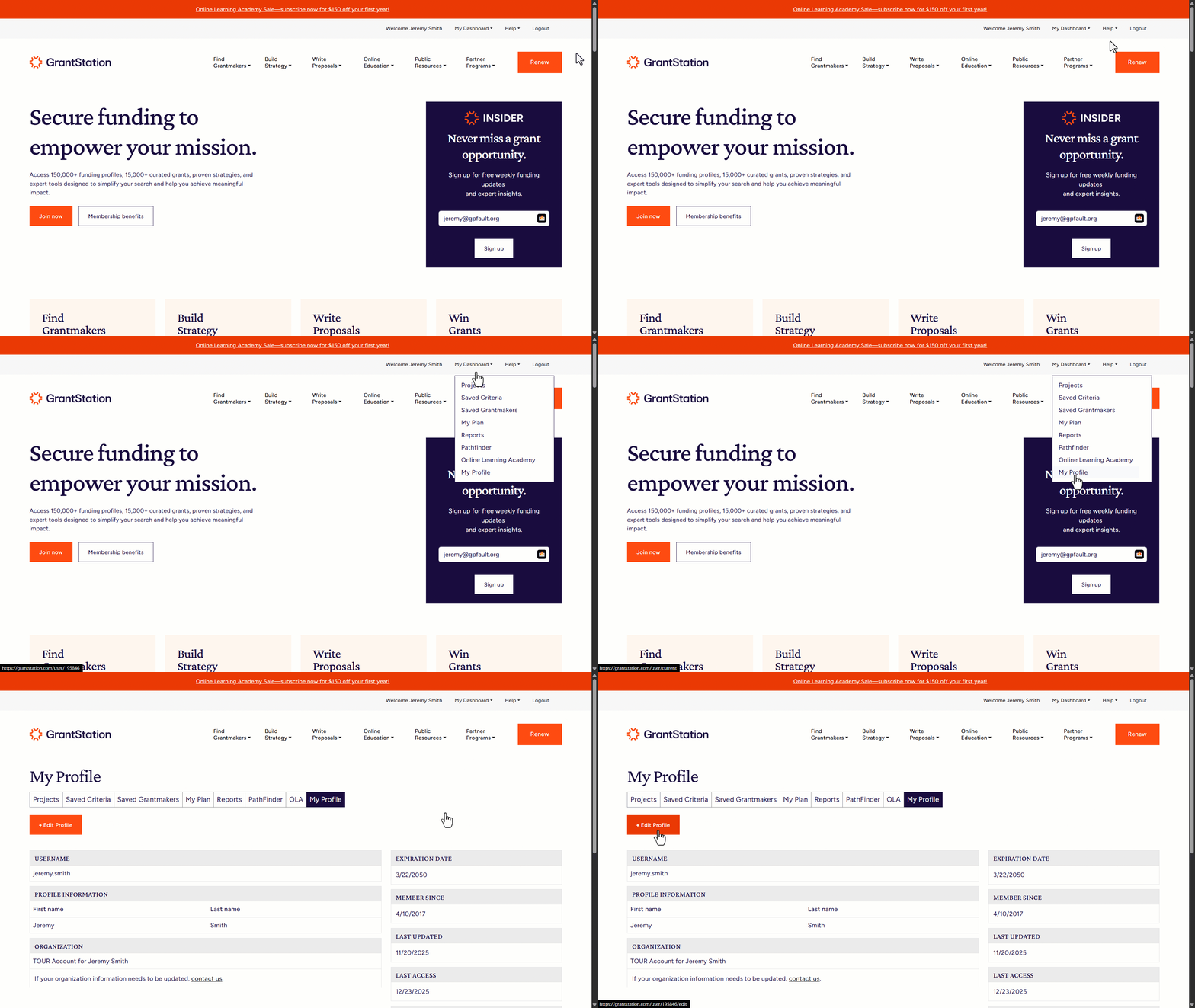
After you log in, go to My Dashboard>My Profile.
Please contact us directly and we can update that for you.
After you log in, go to My Dashboard>My Profile>Edit Profile.
Please contact us directly and we can update that for you.
Your billing address is on the account. Contact us if you need the address updated.
If you want to manage this feature visit:
My Dashboard>My Profile>Manage Subscriptions, and you can change the auto-renew setting there.
- If your membership is an auto-renew subscription, after logging in, visit My Dashboard>My Profile>Manage Subscriptions, and you can change the auto-renew setting there.
- If your membership is not auto-renewed, you do not need to do anything. Your membership will expire, requiring no further action.
EMAIL QUESTIONS
- It is possible your email program or provider is blocking the Insider. To make sure your program isn't blocking the newsletter, go to your junk email box and check your spam filters.
- All email programs are different, but most email services with spam or junk mail folders offer users a simple method to designate which email addresses are safe and should come to the user's main email folder.
- If you have checked these and are still having an issue receiving our mailings please contact us and we can work towards a solution.
Yes! Individuals can sign up on the main page of our website.
Use the link on the bottom of the Insider email to modify and update your information, or contact us directly.
You received the new funder alert because we want our Members to know, review the funder profile, and add it to their plans for the coming year. We regret that we didn't discover this new funder sooner, but we are researching and creating new records daily.
You can unsubscribe from any of our mailing lists by using the unsubscribe link at the bottom of the email.
You can unsubscribe from Funding Alerts by going to My Dashboard>My Profile and under Communication Preferences click on "Edit communication preferences".
Emails related directly to your membership and receipts are separate from this system.
If you are having any problems with unsubscribing please reach out to us directly.
ABOUT GRANTSTATION
Our GS Verified records include only those funders that accept proposals, letters of inquiry, or some other type of initial communication from organizations. Oftentimes, if a funder isn’t listed, it might be because the organization is brand new, they may have asked us to remove them from the database, or they may be a closed-door funder. You can search for those funders in our 990-PF section and view their giving history as reported to the IRS. If you have a question about a funder, feel free to contact our Research Staff at research@grantstation.com.
GS Verified records have been crafted by our team of researchers. These have been selected because they are actively accepting grant applications or unsolicited inquiries and because of their breadth of giving. The information is sourced from the funder’s website, annual report, audited financials, 990 reports, and direct communication with the funding organization. This record is more accurate, up to date, and includes more details than a 990-PF record.
990-PF records are from private foundations that have filed an IRS 990-PF Form. You can search for grantmakers who have filed within the past 5 years, and you can review grants awarded, financial information, and any application procedures that they have indicated on their submitted IRS form.
We know most of our Members are performing grantseeking with limited resources and limited time, so we aim to give them the most likely leads for their efforts.
Records are updated systematically on a daily basis. Records that have been fully updated have a date stamp at the bottom of the funder profile.
We do not offer grants, partnerships, or sponsorships but are a resource for non-profits seeking grant opportunities.
GS does not offer grantwriting services. We do have an on-demand course which covers the entire process of writing a grant from initial research to managing your winning grant, step-by-step. We also have the Write section of our website that walks you through each step of the grant process.
AI tools like ChatGPT and Gemini can definitely help you dig up publicly available grant opportunities using web searches and summaries. But, GrantStation takes it several steps further. Our research team has access to subscription-only publications, proprietary databases, foundation records, and insider info that often doesn’t show up in search engines and usually isn’t accessible to AI tools. Even more important, we personally verify every listing and maintain ongoing relationships with funders. That means our database is always being updated to reflect the latest deadlines, eligibility details, and funding priorities. It’s a level of accuracy and curation that AI just can’t match on its own. AI is a great starting point, but if you want reliable, vetted, and often hard-to-find funding info, GrantStation has you covered.
HOW TO SEARCH
By default you can search by funders that match ANY of your given areas of interest/target populations and type of support. This will give you a much wider group of results to view.
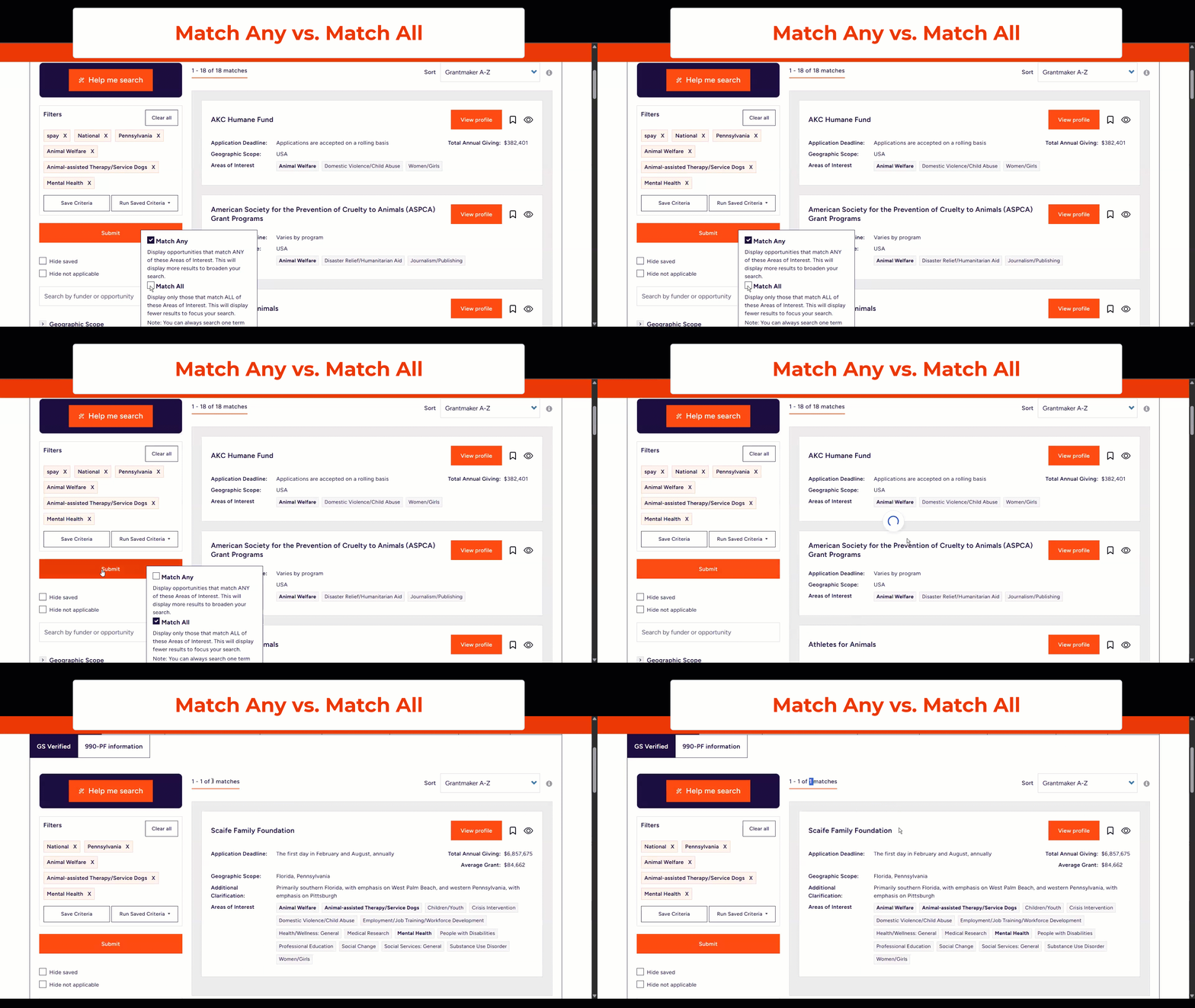
You can also search by funders that match ALL of your given areas of interest/target populations and type of support. This will provide you with a more precise result. You can also mix and match seeing results for ANY and for ALL between those three search criteria.
This means that the funder’s detailed grant-award information was not included with their uploaded tax documents. In many cases, tax preparers submit the grant details on a separate attachment, which does not always make it into the final uploaded file. The note “see schedule attached” indicates that the supporting schedule was not provided. You may want to contact the funder directly to request the full grant details.
We have videos that cover GrantStation's features available on our How-To Videos page. They cover everything from how your dashboard functions to in-depth guides for finding the right funding for a given need. This is where you can see the latest video updates we have or watch our most recent guided webinar. It may also be a good idea to sign up for one of our monthly free webinars called Your Guide to GS, and you can ask your questions to one of our in-house experts during the event.
We’re here to help! Reach out to us with any questions that you have.